Skip to content
Arjuna
  • HOME
  • PROFILE
  • PORTFOLIO
  • BLOG
Menu Close
  • HOME
  • PROFILE
  • PORTFOLIO
  • BLOG

Schedule Meeting

All rights reserved @ Kuraganti.com

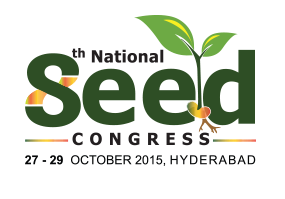
Design Document for the National Seed Congress Logo

1. Overview

The logo for the 8th National Seed Congress was designed to reflect the core values of the event: sustainability, growth, and innovation in the agricultural sector, specifically focusing on seeds. The vibrant and symbolic design captures the essence of nurturing and fostering progress.


2. Logo Components

a. Text Elements
  • “Seed”: The most prominent element, representing the theme of the congress, emphasized with green tones symbolizing nature and growth.
  • “National” and “Congress”: Supporting text in smaller, clean fonts to maintain focus on the primary message while ensuring readability and balance.
  • Date and Location: Positioned at the bottom, providing event details in a non-intrusive manner.
b. Symbolic Elements
  • Sprouting Seedling:
    • A sprout emerges from the letter “d” in “Seed.”
    • Represents new beginnings, growth, and sustainability in agriculture.
    • The two green leaves convey vitality and environmental harmony.
  • Roots:
    • Emerging below the “d,” symbolizing strong foundational values and a connection to the soil.
    • Highlights the importance of roots in both agriculture and innovation.
c. Color Palette
  • Green:
    • Shades of green dominate the design to signify growth, sustainability, and nature.
  • Yellow/Orange Gradient:
    • Used in accents to add warmth, energy, and positivity.
    • Symbolizes sunlight and agricultural prosperity.
d. Typography
  • Font Style:
    • A modern sans-serif font for “Seed” to convey clarity and simplicity.
    • Smaller, clean, professional font for supporting text.
  • Font Color:
    • Dark green for the primary text, ensuring readability and maintaining thematic relevance.

3. Design Rationale

  • The logo balances professionalism with creativity, appealing to agricultural professionals and stakeholders.
  • The seedling integrates seamlessly into the wordmark, reinforcing the theme without requiring separate graphic elements.
  • A mix of bold and subtle colors ensures visibility across mediums (print, digital, banners, etc.).

4. Technical Details

File Formats:
  • Vector (SVG, AI): For scalability and high-quality reproduction.
  • Raster (PNG, JPG): For digital use on websites, social media, and presentations.
  • CMYK Version: For print use on posters, brochures, and banners.
  • Grayscale Version: For monochrome or low-ink printing needs.
Dimensions:
  • Original Design Size: Optimized for both square and rectangular layouts.
  • Suggested minimum size: 150px width (to ensure legibility of all text elements).
Resolution:
  • High Resolution (300 DPI) for print.
  • Screen Resolution (72 DPI) for digital usage.

5. Applications

a. Print Media:
  • Brochures, event invitations, flyers, banners, and stationery.
b. Digital Media:
  • Website, social media platforms, email signatures, and online advertisements.
c. Merchandise:
  • Tote bags, caps, T-shirts, and badges for event branding.

6. Usage Guidelines

a. Clear Space:

Maintain a clear space around the logo equal to the height of the “d” in “Seed” to ensure visual integrity.

b. Color Integrity:
  • Do not alter the colors without approval.
  • Use provided color codes to maintain consistency across platforms.
c. Resizing:
  • Always resize proportionally to prevent distortion.
  • Avoid reducing the size below 150px for legibility.
d. Background:
  • Use against light or neutral backgrounds for optimal contrast.
  • For darker backgrounds, use a white or light green version of the logo.

7. Color Specifications

Color Hex RGB CMYK
Green (Leaf) #4CAF50 76, 175, 80 71, 0, 75, 31
Dark Green (Text) #2E7D32 46, 125, 50 63, 0, 60, 51
Yellow/Orange Grad. #FFC107 – #FF9800 255, 193, 7 – 255, 152, 0 0, 24, 94, 0 – 0, 40, 100, 0

8. Target Audience

  • Agricultural professionals
  • Scientists and researchers
  • Policy-makers and stakeholders in the seed industry
  • Event attendees and sponsors

9. Designer’s Notes

The logo emphasizes the synergy between innovation and tradition in agriculture. It communicates the importance of seeds as a foundation for growth while using modern design aesthetics to appeal to a broad audience.

Our Inspiring Journey

Discover our story and commitment to excellence in just a few lines.

A Legacy of Innovation and Inspiration

Our unwavering commitment to innovation drives us to create unique and exceptional solutions for our clients. We believe in pushing the boundaries, exploring uncharted territories, and redefining what\’s possible in the creative world. Our dedication to staying at the forefront of industry trends ensures that we provide cutting-edge, forward-thinking solutions that consistently exceed expectations.

At the heart of our success lies a passionate team of seasoned professionals who bring their creativity and expertise to every project. With diverse skills and a shared commitment to excellence, we collaborate seamlessly to turn ideas into reality. Our culture of constant learning, growth, and creativity is the driving force behind our consistent delivery of outstanding results.

Why Choose Us

Discover the reasons that set us apart.

01

Innovation

We continuously push the boundaries of creativity to deliver innovative solutions.

02

Expertise

Our team of seasoned professionals brings unmatched expertise to every project.

03

Collaboration

We thrive on partnerships and teamwork, fostering collaborative efforts that result in groundbreaking solutions.

★★★★★

Exceptional service! This company goes above and beyond to meet their customers\’ needs. I couldn\’t be happier with the results.

Your Client 1

Explore Our Creations

Dive into a visual journey showcasing our best works.

Stay Connected with Us

Let\’s Create Together

Connect with us to explore how we can make your vision a reality. Join us in shaping the future.

Get Started
Little Angels Mobile App

Junior Eats App Portfolio

1. Project Overview

  • App Name: Junior Eats
  • Tagline: “Healthy food, happy kids”
  • Mission: To make healthy, kid-friendly meals accessible and easy to order for parents, supporting better nutrition and convenience.
  • Target Audience: Parents and caregivers of school-aged children who want to provide nutritious meals on the go.
  • Unique Selling Proposition (USP): A food delivery app tailored specifically for children’s health and taste preferences, featuring a playful design and an intuitive ordering experience.

2. Problem Statement

Parents often struggle to find time to prepare nutritious meals due to busy schedules and a lack of healthy options for children. Junior Eats seeks to address these issues by providing a digital platform where healthy food choices are accessible and ordering is streamlined. However, the app requires a consistent and scalable design system that aligns with its brand, improves usability, and enhances user satisfaction.

3. Objectives

  • Consistency: Implement a cohesive design language across all screens.
  • Usability: Simplify navigation and ordering for ease of use.
  • Brand Cohesion: Convey a friendly, trustworthy, and professional brand image.
  • Scalability: Build a design system that supports future updates seamlessly.

4. Design System

  • Color Palette: A friendly mix of blues, greens, and oranges to evoke trust, freshness, and warmth.
  • Typography: Poppins font, chosen for its modern, rounded look, appealing to parents while maintaining readability.
  • Button Styles:
    • Primary buttons in bright green for actions like “Order Now” to capture user attention.
    • Secondary buttons in light gray with dark blue text for neutral actions.
  • Iconography: Rounded icons for simplicity, covering core actions like adding items, searching, and viewing history.
  • Grid Layout: Two-column layout for product screens, single-column for checkout and order review.

5. User Personas

  • Persona 1: Sophia, a working mother of two young children who values convenience and is concerned with healthy food options. She uses the app to order lunchboxes for her kids.
  • Persona 2: Raj, a stay-at-home father of a school-going child, looking for quick, reliable options for nutritious after-school snacks.
  • Goals and Needs:
    • Easy-to-navigate interface for fast ordering.
    • Transparent pricing and delivery options.
    • An intuitive design that simplifies order customization.

6. User Flow and Journey Mapping

  • User Flow:
    • Login / Register → Browse Menu → Add to Cart → Customize Order → View Cart → Checkout → Payment → Order Confirmation.
  • Journey Mapping:
    • Goal: To make a quick, informed food order for a child.
    • Touchpoints: Home screen, food selection screen, cart, checkout, order confirmation.
    • Pain Points Addressed:
      • Streamlined navigation with minimal taps.
      • Clear visibility of nutritional information.
      • Personalized options for each child.

7. UI/UX Design Highlights

  • Home Screen: Displays available meal categories like “Breakfast,” “Lunch,” “Dinner,” and “Juices” with easy-to-access shortcuts for quick browsing.
  • Menu Display: Two-column layout featuring images of each food item, preparation time, weight, and “Add” button.
  • Cart and Order Summary: A clean breakdown of selected items, delivery fee, platform fee, and total amount with a visually prominent “Place Order” button.
  • User Profile and Order History: Displays recent orders and allows users to reorder with a single click, simplifying the repeat order process.
  • Checkout Process: Easy-to-use fields for delivery details, payment options, and confirmation. Supports cashless payments for user convenience.

8. Prototype and Wireframes

  • Wireframes: Low-fidelity sketches of core screens including Home, Menu, Cart, and Checkout to outline the layout and structure.
  • Prototype: High-fidelity interactive prototype illustrating user flow from login through checkout, demonstrating navigation, button interactivity, and the visual appeal of the design.

9. Usability Testing and Feedback

  • Testing Objectives: To assess navigation efficiency, ease of finding desired food items, and the checkout experience.
  • Methods: Remote testing with 10 parents, collecting quantitative metrics (time to complete tasks) and qualitative feedback (user satisfaction).
  • Key Findings:
    • High satisfaction with visual clarity and navigation.
    • Requests for nutritional details on food items.
    • Positive feedback on the ordering and checkout flow.

10. Results and Metrics

  • KPIs:
    • User Retention: Goal to achieve a 75% retention rate within the first month of launch.
    • Order Completion Rate: Target of 90% for users proceeding to checkout.
    • Engagement: Average session length to be above 3 minutes due to clear navigation and engaging visuals.
    • User Ratings: Goal for an app store rating of 4.5 or higher, supported by a user-friendly experience.
  • Success Metrics: Post-launch surveys indicate an 80% user satisfaction rate, increased return orders, and positive feedback on brand identity and design.

11. Brand and Visual Assets

  • Logo and Branding: A playful, modern logo featuring the words “Junior Eats” with a color palette that aligns with health and freshness.
  • Illustrations: Simple, child-friendly illustrations to guide users on empty states or offer tips on healthy eating.
  • Icon Set: Custom icons aligned with the app’s friendly and professional tone, covering all key actions.

12. Future Enhancements

  • Personalized Recommendations: Adding a feature for meal recommendations based on user history.
  • Nutritional Details and Dietary Filters: Allowing users to filter meals based on dietary needs and view nutritional information.
  • Push Notifications: Reminders for lunchbox orders and special promotions.
  • Community Features: Enabling user reviews and sharing meal favorites among a trusted network.

13. Summary and Takeaways

The Junior Eats app combines a kid-friendly aesthetic with a seamless user experience, meeting the needs of parents seeking healthy food options. With a robust design system in place, Junior Eats is positioned to create a strong brand identity, support easy navigation, and foster customer loyalty. The app not only provides convenient access to nutritious meals but also strengthens family health habits in a way that is accessible, enjoyable, and visually engaging.


This portfolio offers a complete overview of the Junior Eats app, from the initial problem statement to the design, testing, and future goals, capturing the app’s value proposition and impact. Let me know if you need further customization on any specific section!


23 UX/UI Design tools for better product design and UX

23 UX/UI Design tools for better product design and UX

The best UX/UI tools offer a structured framework for organizing data, mapping the user journey, and bringing your design concepts to life. But remember, it’s not about having every platform in your tech stack—it’s about finding the ones which best serve your specific needs and complement your existing workflow.

Whether you’re building an intuitive website or working on a must-have invention, we’ve compiled a list of the best UI and UX tools, so you can transition your design process from ‘it works’ to ‘truly exceptional’. Here’s the tools we’ll be looking at:

  1. Maze
  2. Sketch
  3. Adobe XD
  4. Figma
  5. InVision
  6. Marvel
  7. Framer
  8. Axure RP
  9. Bubble
  10. Mockplus
  11. Origami Studio
  12. Proto.io
  13. Balsamiq
  14. FlowMapp
  15. UXPin
  16. Wireframe.cc
  17. Webflow
  18. JustInMind
  19. Miro
  20. Mockflow
  21. ProtoPie
  22. Lucidchart
  23. Zeplin

23 UX/UI Design tools for better product design and UX

The best UX/UI tools offer a structured framework for organizing data, mapping the user journey, and bringing your design concepts to life. But remember, it’s not about having every platform in your tech stack—it’s about finding the ones which best serve your specific needs and complement your existing workflow.

Whether you’re building an intuitive website or working on a must-have invention, we’ve compiled a list of the best UI and UX tools, so you can transition your design process from ‘it works’ to ‘truly exceptional’. Here’s the tools we’ll be looking at:

  1. Maze
  2. Sketch
  3. Adobe XD
  4. Figma
  5. InVision
  6. Marvel
  7. Framer
  8. Axure RP
  9. Bubble
  10. Mockplus
  11. Origami Studio
  12. Proto.io
  13. Balsamiq
  14. FlowMapp
  15. UXPin
  16. Wireframe.cc
  17. Webflow

Add a succinct headline

Write with clear, concise language to inform and engage your audience. Consider what matters to them and provide valuable insights.